A patch is a small file that only holds the differences between a ROM and a modified version of it: a translation, a bug fix, a hack. It is shared instead of the modified ROM, since sharing the ROM would mean sharing the game; each user applies it to their own copy.
RomSieve applies the patches of a folder to the ROMs of your collection: each patch whose original ROM is identified in the source gives a patched version, written in the destination next to the original version, or in a folder of its own (see A folder for the patched versions). The original ROM is never modified.
A patch only applies to the exact ROM it was made for: same region, same revision, same dump. RomSieve finds it for you by its checksum (CRC32), which needs a DAT file.
| Format | Extension | Original ROM found by | Checks |
|---|---|---|---|
| IPS | .ips |
your choice, otherwise the CRC32 written in the name of the patch, or in its readme (see Matching) | none: the format records no checksum |
| IPS32 | .ips or .ips32 |
your choice, otherwise the CRC32 written in the name of the patch, or in its readme | none |
| UPS | .ups |
the CRC32 and the size it records | CRC32 of the patch, of the original ROM and of the result |
| BPS | .bps |
the CRC32 and the size it records | CRC32 of the patch, of the original ROM and of the result |
The format is read from the content of the file, not only from its extension. UPS and BPS are the safest: they only apply to the right ROM and check their result. A damaged or truncated patch is refused before it is applied.
The other formats (xdelta, PPF, APS, BSDiff…) are not supported: their files are ignored. MAME arcade sets and the software of MAME software lists are never patched.
In the Collection step, the Patches card has the Folder of the patches field, with its Browse... button. It is always shown, whatever the convention. Next to its title, Manage patches… opens the Patches window on the last simulation (see The Patches window); it is greyed out until a simulation found patches.
.ips, .ips32, .ups and
.bps files are read, and the .txt and
.nfo texts that may give the original ROM of an IPS (see Matching).The Apply the patches box, next to the title of the card, is checked by default, and checks itself when you choose a folder with Browse.... Unchecked, no patch is applied, but the folder stays in the settings and the profiles for next time: it is not read, Write the patched versions only and the folder of the patched versions are greyed out, and the log says that applying the patches is turned off. The rest does not change: a folder of the patches inside the source is still not sorted as ROMs, and the destination still may not overlap it, so that a purge never puts your patches in quarantine.
The log of the simulation tells how many patches were found and how many gave a patched version.
Only a ROM identified in the DAT can receive a patch, whatever its status: a release left out by 1G1R receives its patch like any other. This is often the case of a translation, made for the Japanese release of a game that 1G1R leaves out in favour of the American release.
Game (Japan) (T-En) [47E70E08].ips,
(0x47e70e08)).File/ROM CRC32: 47E70E08) or
another (CRC32 : 0x47e70e08). See Readme of an IPS.A readme is a .txt or .nfo text file of at
most 1 MB, stored next to the patch: in the same folder of the folder of
the patches, or in the same archive, at the same place. A readme on the
disk never comes with a patch stored in an archive, nor the reverse.
Game (T-Fr).txt
for Game (T-Fr).ips, case ignored) is its own.For the CRC32, RomSieve only reads the lines where the word CRC appears, and on them the CRC32 that follow it. A readme often also gives the CRC32 of the patched result: it designates no ROM of the source, and it is ignored. Your choice, then the name of the patch, always prevail over its readme, and a UPS or a BPS, which records its original ROM itself, never reads its own.
A readme sometimes gives the CRC32 of a ROM with and without
its copier header, on two lines (for example
File CRC32 and ROM CRC32). An IPS does not
tell which of the two forms it expects: RomSieve does not apply it. The
readme usually tells which form the patch was made for: then choose that
form in the Patches window (see Choosing the ROM of a
patch).
The detail panel of a patched version names the readme that gave the CRC32.
A readme often also names the ROM the patch was made for, by its
No-Intro name followed by its extension
(Make sure to use the "Super Mario Bros. 2 (USA).nes" ROM,
Mega Man 2 (USA).nes - NOINTRO, or after
Database match:). When no CRC32 designates a ROM of the
source, RomSieve proposes the ROM so named in the
Patches window ("readme.txt gives the name of this
ROM"), never applying it on its own: a readme may name another revision,
or a ROM that must be translated first. The name is compared with those
of the DAT, case ignored, as a file name and as the name of the game (a
readme writes .nes where a DAT without header writes
.unh). A GoodTools name ((U) [!]) or an
approximate one designates no ROM. When the ROM named is in the DAT but
not in the source, the reason of the patch names it.
_01
whatever the mode: both are written.A patch made for the whole file of a ROM with a copier header gives a result that has one: it is written as the patch produces it. A patch made for the data without the header gives data alone:
When such a patch changes the size of the data (a patch that enlarges the ROM), the header is written as it is, and may no longer give their right size: the log says so for each patched version concerned. A patch made for the whole file, which can update the header itself, does not have this problem.
The header must still be the one of the original ROM when the patch is applied: a header changed since the simulation puts the patched version in Error, without writing anything.
Old iNES 1.0 header. Current NES ROMs have a NES 2.0 header, which gives details in its last bytes. Older patches, and the CRC32 their readmes and the romhacking.net page of each patch give, were made with the iNES 1.0 header of the time, where these bytes were zero: their CRC32 is that of no current file, nor of any ROM of the DAT. RomSieve thus also looks for each NES ROM under this old header, computed from its own (the data stay the same). A patch made for it then applies to the ROM read this way, and the result is written as the patch produces it, with the header it holds. The detail panel says so ("under an old iNES 1.0 header"). A ROM that already has an iNES 1.0 header does not need this form, and a ROM without a header cannot get it.
The name always starts from that of the original ROM, as the DAT gives it: the region and the revision come from the DAT, never from the author of the patch, and each patched version sorts next to its original ROM. The label in square brackets comes from the name of the patch:
| Patch | Original ROM | Patched version |
|---|---|---|
Game (Japan) (T-En).bps |
Game (Japan).sfc |
Game (Japan) [T-En].sfc |
Game (T-En v1.2).bps |
Game (Japan).sfc |
Game (Japan) [T-En v1.2].sfc |
Game (T-En) [47E70E08].ips |
Game (Japan).sfc |
Game (Japan) [T-En].sfc |
SMB3_eng_v1.2.ups |
Super Mario Bros. 3 (Japan).nes |
Super Mario Bros. 3 (Japan) [SMB3_eng_v1.2].nes |
Alpha (1990)(Ocean)[h Hack].bps |
Alpha (1990)(Ocean).adf |
Alpha (1990)(Ocean)[h Hack].adf |
[h],
[tr]): in No-Intro and Redump, parentheses describe an
official release. For a TOSEC ROM, the label follows the name without a
space, as a TOSEC flag.patch,
patched, hack, fix,
translation, rom, game,
english, eng, update, or a
version alone such as v1.1) gives way to the name of the
archive that holds the patch, or of its folder in that archive, then to
the name of its folder in the patch folder, if that folder holds no
other patch (a folder of several patches sorts them, by system or by
kind, and tells nothing of each one).
CT Translation/patch.ips gives
Chrono Trigger (Japan) [CT Translation].sfc. Without a
better label, the generic name is kept.patched: Game (Japan) [patched].sfc. The
patched version never has the name of its original ROM.Check Write the patched versions only, in the
Output step, under the Patched
versions field (Directory tree frame), so that a game
that has a patched version is only written in that form. With 1G1R, the
ROM kept for that game is not written, even when the patch was made for
another release of the game: a patch made for
Game (World) (Collection).md, which 1G1R leaves out for
Game (World).md, gives the only patched version, and
Game (World).md is not written. Without 1G1R, each ROM kept
is a choice of its own, and only the original ROM of the patch is
replaced. The table shows a ROM replaced Excluded, with
the reason Replaced by a patched version; a ROM that 1G1R
already left out keeps its reason. With the option unchecked, the ROM
kept and the patched version are both written. The option is greyed out
without a folder of the patches, or with Apply the
patches unchecked.
By default, a patched version goes into the folder of its original ROM. The Patched versions field of the Output step, in the Directory tree frame, under the Pattern, puts it elsewhere, for two uses:
The field is a pattern of folders, like the Pattern
(see Variables),
but it starts from the root of the destination, even
with All at the root: the folders of a lot of DATs are
not added to it on their own. Its variables take the values of the
original ROM ({title}, {dat},
{publisher}…), even when 1G1R leaves it out, and two
variables exist for it alone:
| Variable | Content |
|---|---|
{origin_folder} |
The whole folder the original ROM goes into: the folder of its DAT in a lot (under the folders of its path when they are mirrored), then the folders of the pattern; none with All at the root |
{dat_folder} |
The folder of the DAT of the original ROM in a lot, under the folders of its path when they are mirrored; none for a single DAT, or without A folder per DAT |
Each makes up a folder on its own, between two /:
{origin_folder}/Patches is allowed,
{origin_folder}-patches is not. Empty, the field (Next
to the original ROM) gives the same folder as
{origin_folder}.
Examples with Chrono Trigger (Japan).sfc, the pattern
{title} and a (T-En) patch:
| Patched versions | Single DAT | Lot, a folder per DAT | Lot, folders of the DATs mirrored (No-Intro/) |
|---|---|---|---|
| (empty) | Chrono Trigger/ |
Nintendo - SNES/Chrono Trigger/ |
No-Intro/Nintendo - SNES/Chrono Trigger/ |
Patches/{title} |
Patches/Chrono Trigger/ |
Patches/Chrono Trigger/ (every DAT together) |
Patches/Chrono Trigger/ |
Patches/{dat}/{title} |
Patches/Nintendo - SNES/Chrono Trigger/ |
Patches/Nintendo - SNES/Chrono Trigger/ |
Patches/Nintendo - SNES/Chrono Trigger/ |
{dat_folder}/Patches |
Patches/ |
Nintendo - SNES/Patches/ |
No-Intro/Nintendo - SNES/Patches/ |
{origin_folder}/Patches |
Chrono Trigger/Patches/ |
Nintendo - SNES/Chrono Trigger/Patches/ |
No-Intro/Nintendo - SNES/Chrono Trigger/Patches/ |
The file keeps its name there,
Chrono Trigger (Japan) [T-En].sfc (a .zip
archive in ZIP mode). The _unmatched folder of the
non-conforming files stays at the root: a patched version never goes
there, since its original ROM is identified.
{origin_folder}) and Folder of the
DAT ({dat_folder}, greyed out outside a lot with
A folder per DAT).{origin_folder}/Patches) and Folder at the
root (Patches/{dat}/{title}), which leaves the
folder of each DAT without unknown files.Nothing is written outside the destination. A folder that would leave
it, or write into the folders RomSieve keeps for itself, is
refused: a path that starts with / or
\, a drive (C:), a .. folder, a
character forbidden in a name (< > : " | ? *),
_purged or .romsieve as first folder,
{origin_folder} or {dat_folder} that is not a
folder on its own. The preview says why, a line says so under the
Output step (Patched folder refused), and both
the simulation and the sort are refused before anything is written. An
unknown variable, a brace without its pair or an _unmatched
folder are only a warning of the preview, as for the pattern.
Changing the folder of the patched versions makes the last simulation out of date; the next one marks the patched versions alone Changed. Undo Last Sort deletes them, and the folders it empties.
| Mode | Patched version |
|---|---|
| Copy | A file, written next to the original ROM or in its folder |
| Move | A file, written before the original ROM leaves the source. With Write the patched versions only, the ROM it replaces stays in the source. |
| Hard link, Symlink | A copy: a link cannot hold modified data. The log says so. |
| ZIP | An archive of its own, in the TorrentZip format, like that of any other game, in the same folder |
An original ROM stored in an archive is extracted next to the target while the patch is applied, then deleted. The archive is never modified.
The writing follows the same safety rules as any other (see Safety, purge and undo): the file only appears under its name once complete, and a stopped or failed sort leaves no truncated file. The CRC32 of the original ROM is checked while the patch is applied: a ROM modified since it was identified is refused, even for an IPS. For a UPS or a BPS, the CRC32 of the result is checked too: a wrong result puts the patched version in Error, leaving nothing in the destination. With Verify copied files, the patched version is read again once written.
A patch that gives no patched version has its line in the log, with its reason:
| Reason | What to do |
|---|---|
| The original ROM, name, is missing from the source (or: a readme designates the original ROM, name, …) | The DAT knows this ROM, but the source does not have it: add it to the source. In a lot, the DAT of the ROM follows its name |
| A readme names the original ROM, name, which is missing from the source | The readme gives no known CRC32, but names a ROM of the DAT: add it to the source, or check the revision the readme expects |
| No ROM of the DAT has this CRC32: the patch was made for another dump or for a hack | Look for the ROM the readme of the patch asks for; for an IPS, choose a ROM for it in the Patches window |
| No ROM of the DAT has this CRC32: … or for another form of the ROM than the one the DAT describes (with another copier header, or without) | For the NES, the Lynx or the Super Nintendo, the patch may have been made for the ROM with a header (or another header) when the DAT describes it without, or the reverse: a DAT of the other form will name it. For an IPS, choose its ROM and its Form in the Patches window |
| Neither the name of the IPS patch nor a text that comes with it gives the CRC32 of the original ROM | Choose its ROM in the Patches window (see Choosing the ROM of a patch) |
| Unreadable patch | The file is truncated, damaged, or of another format |
| The name of the patch gives the CRC32 of several ROMs of the source | Choose the right ROM in the Patches window |
| A readme gives the CRC32 of several ROMs of the source | Choose the right ROM in the Patches window |
| A readme gives the CRC32 of a ROM with and without its copier header | Choose in the Patches window the form it was made for |
| The ROM you chose for this patch is not identified in the source | It left the source, or the DAT no longer identifies it: choose another one, or go back to the automatic choice |
| The original ROM is part of a game in several files | A .cue and its tracks, or a game on several disks:
these games are not patched |
| The ROM does not have the size the patch expects | It is not the ROM the patch was made for |
A patch you set aside is not among them: the log says so apart (Patch set aside at your request). To silence a patch nothing fixes, set it aside (see Not applying a patch).
Without a DAT, the patches are not read: the log says so.
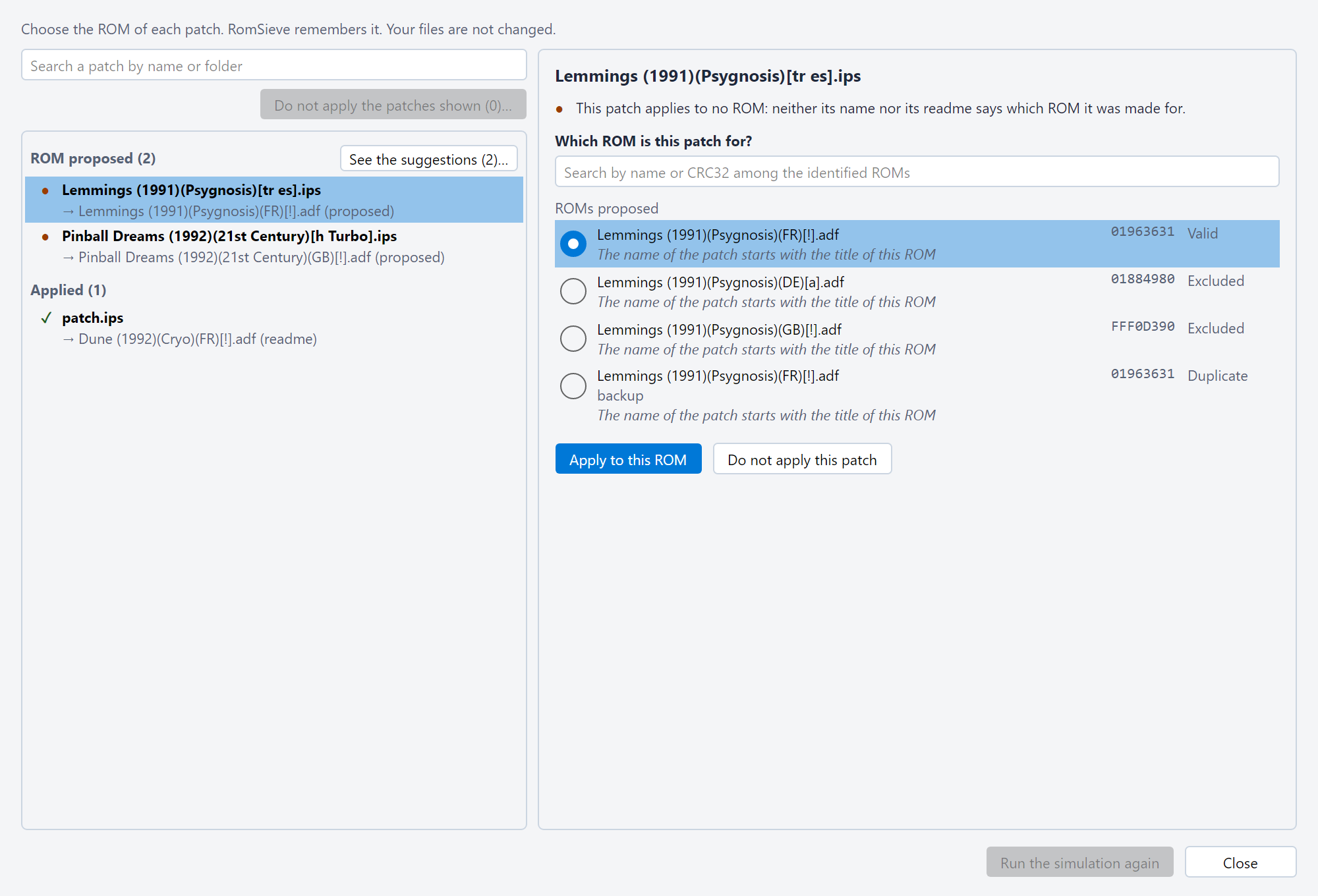
The Patches window shows every patch of the last simulation, and it is where you tell RomSieve what to do with them. It opens after a simulation:
On the left, the patches are grouped by state:
The search above the list keeps the patches whose
name or folder holds every word, in any order (-word leaves
out): FF3 extra only shows the patches of the
Extra & Visual Patches folder of FF3. The groups, their
counts and See the suggestions keep only the patches
found. The cross clears the search.
On the right, the detail of the patch selected says in plain words where it stands (for a patch applied: what designates its ROM, and the name of its patched version), then gives its actions: Apply to this ROM and Do not apply this patch. Once you made a choice for the patch, its state line ends with a link that forgets it (see Not applying a patch). Under it, a line says your last change ("ROM chosen: …", "Patch set aside", "File renamed to …") and offers Undo (see Your choices).
The footer counts the patches modified. Run the simulation again runs the simulation again, which follows your choices: the window stays open and shows its results, on the same patch. If you close the window with choices the simulation has not seen yet, it runs again: the table always shows what your choices give.
A UPS or a BPS designates its own ROM and checks it: no other one is chosen for it. For an IPS, the detail asks Which ROM is this patch for?:
CT Translation/patch.ips). Generic names
(patch, fix, v1.1…) do not count.
The whole name comes before the title alone, then the ROM the sort
writes. For a patch whose name or readme designates several ROMs, those
ROMs; for a patch applied, the ROM it is applied to. Under each ROM, its
folder in the source tells two files of the same name apart, and a line
says why it is proposed ("The name of its archive starts with the title
of this ROM", "readme.txt designates this ROM", "readme.txt gives the
name of this ROM"…). The ROMs the readme names come before those of the
name of the patch. On the right, its CRC32 (in the DAT) and its status
in the simulation (Valid, Excluded,
Duplicate, as in the table), with its reason in a
tooltip: a ROM 1G1R or a filter leaves out is proposed too, since a
translation is often made for it. The first one is chosen, but never
applied without your click.[tr fr] in TOSEC, (T-En),
[T+Eng]), the ROMs already in that language (from their
languages, otherwise their country) come after the others, and say so. A
patch Game (T-En).ips thus proposes
Game (Japan) before Game (USA).0x) among all the
ROMs identified by the simulation, when no ROM proposed is the right
one: a translated (Super Mario Frères.ips for
Super Mario Bros.) or shortened title proposes none. All
the words, in any order. Each result (Other ROMs) shows
its CRC32 and status on the right, with its full path in a tooltip. A
ROM found (a click, or Enter for the first one) joins the ROMs proposed
and becomes the choice. Ctrl+F goes to the search.Apply to this ROM saves your choice: the next simulation applies the patch to that ROM, whatever its name and its readme say. The file of the patch is not changed, and a patch stored in an archive is chosen like any other. While the current ROM of a patch applied is chosen, the button is greyed out. The Enter key never saves anything.
If a patched version does not work, because the patch was made for another ROM, choose the right one for it the same way: your choice wins over the CRC32 of its name and over its readme.
See the suggestions (n)…, on the title of the ROM proposed group, applies nothing: it shows for each patch the ROM chosen, then the folder of the patch and why the ROM is proposed ("The name of the patch starts with the title of this ROM"…), enough to judge each suggestion. Nothing is checked beforehand. Check those to apply (or Check all), then Apply (n); Back returns to the detail without saving anything.
Do not apply this patch sets the patch selected aside, whatever its format: the next simulation does not apply it, nor counts it among the patches not applied. It is also the way to silence a patch that applies to nothing and that you want to keep in the folder. The context menu of a patched version of the table offers the same action, which runs the simulation again at once.
To set aside at once the patches that will never apply (those that apply to a ROM already patched, for example), search for them, then click Do not apply the patches shown (n)…, under the search. The button is greyed out without a search, which would show every patch. It shows the list of the patches found, all checked, with their folder: uncheck those to keep, then Do not apply (n); Back saves nothing. Each patch set aside can then be taken back.
Back to the automatic choice, at the end of the state line of a patch you chose a ROM for, forgets your choice: the next simulation applies it again from what it records, its name or its readme. For a patch set aside, the link reads Take this patch back and does the same; Do not apply this patch is then no longer shown.
The patched version a sort already wrote in a destination stays in place: Undo Last Sort deletes it, if that sort is the last one.
patch_links.json
file, next to its settings (see Where RomSieve
stores its files). They apply to every profile.patch_links.json file that cannot be read is never
lost: RomSieve keeps a copy of it next to it
(patch_links.unreadable-<date>-<time>.json),
says so in the log, and starts again without choices.Game (T-Fr).ips becomes
Game (T-Fr) [47e70e08].ips), or replaces the one the name
gave. RomSieve does not need it, but the tools that apply an IPS from
its name will apply it too. A patch stored in an archive is never
renamed, and nothing is overwritten: a name already taken leaves the
patch as it was, and the detail says so. Undo gives it
back its old name. The CRC32 added does not appear in the name of the
patched version (see Name of the
patched version).Game (T-Fr) [47e70e08].ips becomes
Game (T-Fr).ips again. This is how a name written before a
new simulation is taken back, when Undo no longer can.
RomSieve applies the patch as before: a patch only its name applied
first gets your choice for the same ROM. For it to apply no more, set it
aside (see Not applying a
patch).Each patched version is recorded in the journal of the sort: Undo Last Sort deletes it, unless it was modified since the sort. Your choices for the patches are not recorded in the journal: Undo Last Sort does not undo them (see Your choices).
--patches <folder> gives the folder of the patches
and applies them, even when Apply the patches is
unchecked in the settings; --no-patches applies none,
without changing the settings; --patch-only only writes the
patched versions (see Command line). The
folder of the patched versions comes from the settings file or the
profile; a folder refused stops run as well as
patches, with code 3. The summary counts the patched
versions and the patches not applied.
romsieve-cli patches simulates the sort and lists all
its patches: those it does not apply, with the ROMs proposed, those it
applies and what designates their ROM, and those you set aside. The
choices of the window are made there too, saved with --yes:
--link <patch> --rom <ROM> applies an IPS to a
ROM (its name, or the CRC32 of the form the patch was made for, required
for a ROM with a copier header), --ignore <patch>
sets a patch aside, --auto <patch> forgets your
choice. --name-from-notes --yes writes the CRC32 in the
name of the IPS applied thanks to their readme, for other tools.