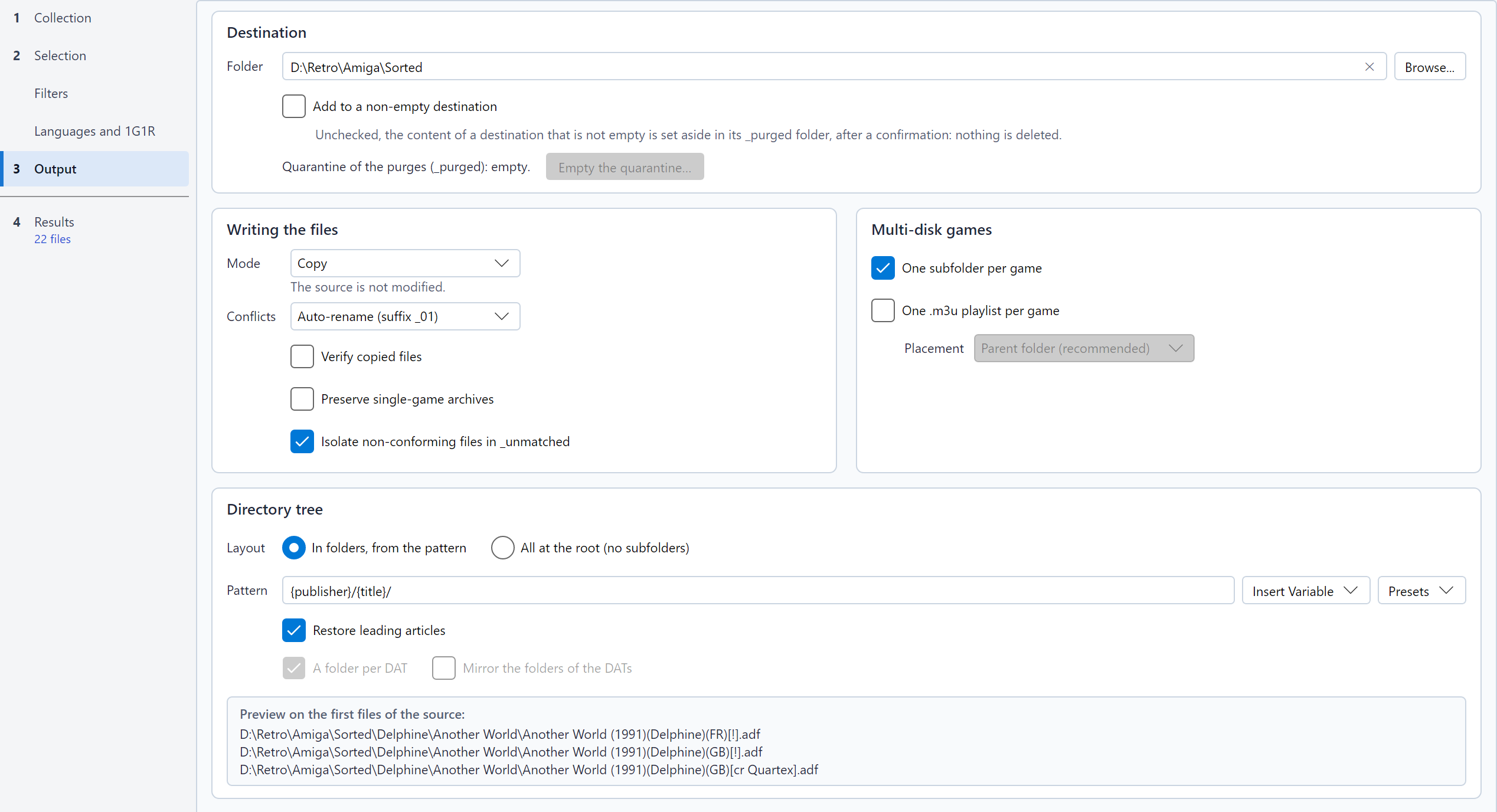
Everything on this page is set in the Output step, in four frames: Destination (the folder, and what to do when it is not empty), Writing the files (mode, conflicts, verification, single-game archives), Multi-disk games (subfolder, playlist) and Directory tree (pattern, articles, folders of the DATs of a lot, preview). The cross at the end of the destination field empties it.
The Pattern describes the folders created for each
game, with variables in braces. For instance, with
{publisher}/{year}/{title}/, the file
Another World (1991)(Delphine)(FR)[!].adf goes to
Delphine/1991/Another World/.
Type the pattern in the field, or use the two menus under it:
| Preset | Pattern | Suits |
|---|---|---|
| Publisher / Year / Title (TOSEC) | {publisher}/{year}/{title}/ |
TOSEC collections |
| Country / Title (No-Intro, Redump) | {country}/{title}/ |
Consoles sorted by region |
| Letter / Title | {letter}/{title}/ |
Alphabetical folders |
| Chipset / Letter / Title (Amiga) | {chipset}/{letter}/{title}/ |
A folder per Amiga (AGA, OCS-AGA, OCS-ECS) |
Choosing a preset goes back to In folders, from the pattern if All at the root was chosen (see below).
At the bottom of the Directory tree frame, the preview shows
where the sort would write three files with the current options:
destination, folders and file name (a .zip archive in ZIP
mode). It is refreshed as you type, and when the source, the convention,
the DAT, the destination, the mode or the options below change.
The preview warns about a pattern that would not do what it says: an
unknown variable (the sort drops it), a brace without its pair (it would
stay in the folder name), or a pattern that writes into
_unmatched, the folder of the non-conforming files.
| Variable | Content | Example |
|---|---|---|
{title} |
Title, without technical tags | Another World |
{letter} |
First letter of the title (# for digits and
symbols) |
A |
{country} |
Country or region, as written in the name | FR, Europe |
{language} |
Language, as written in the name; otherwise the language of its
country (a TOSEC name such as (FR) omits it) |
fr, M3 |
{version} |
Version or revision | v1.1 |
{publisher} |
Publisher (TOSEC) | Delphine |
{year} |
Year of release (TOSEC) | 1991 |
{system} |
System or computer model (TOSEC) | A500 |
{chipset} |
Chipset an Amiga release needs (TOSEC): AGA (AGA only),
OCS-AGA (both, or fixed for AGA), OCS-ECS
(anything else, a name without a mark included) |
AGA |
{video} |
Video standard (TOSEC) | PAL |
{dump_status} |
Dump status (TOSEC) | Verified, Clean, Cracked,
BadDump |
{genre} |
Genre of the machine, from the category file (MAME) | Shooter |
{category} |
Genre and subgenre of the machine (MAME) | Shooter - Flying Vertical |
{dat} |
Header name of the DAT of the file: the DAT chosen, or the DAT of the lot it is sorted with | Nintendo - Game Boy |
An unknown value gives Unknown (empty for
{version}). The names are cleaned of the characters
forbidden by Windows or Linux, and very long paths are supported on
Windows.
The Layout line, at the top of the Directory tree frame, offers two choices: In folders, from the pattern (the default) or All at the root (no subfolders), which puts every file at the root of the destination. It is an option of its own: the pattern stays in its field, greyed with Insert Variable, and is used again when you go back to the folders or choose a preset. A sentence under the two choices recalls it. Restore leading articles stays active, as it also applies to the subfolder of a multi-disk game. A multi-disk game still gets its subfolder if One subfolder per game (Multi-disk games frame) is checked.
A software of a MAME
software list always goes into the folder of its list, where MAME
looks for it: with All at the root,
megadriv/sonic.zip under the destination; with a pattern,
its folders come above that of the list.
With a lot of DATs, two boxes under Restore leading articles keep the files of each DAT apart:
{title}, Tetris (World).gb goes
into Nintendo - Game Boy/Tetris/. Unchecked, every DAT
shares the same folders: the {dat} variable then places the
DAT elsewhere in the pattern, and two files of different DATs that aim
at the same target follow the conflict
rule.TOSEC/Commodore/Amiga/Commodore Amiga - Games - [ADF]/...).
Only with a folder per DAT, and for the DATs kept in subfolders
(--dir-dat-mirror on the command line).Both boxes are greyed out with a DAT file or an archive of a single
DAT: a single DAT never gets a folder of its own, and its output does
not change. The _unmatched folder of the non-conforming
files stays at the root of the destination.
Legend of Zelda, The becomes
The Legend of Zelda in the folder names.The Multi-disk games frame, next to Writing the files:
Mode is a list: each entry gives the name of the mode and a sentence saying what it does (its tooltip has the details), and the sentence of the selected mode stays under the list.
| Mode | What happens | Source | Notes |
|---|---|---|---|
| Copy | Files are copied | Unchanged | The safest choice. |
| Move | Files are moved | Emptied of the kept files | Instant on the same disk; across disks, copied, written to the disk, then deleted. An inspected archive is never moved: its members are extracted (except when Preserve single-game archives is active). |
| Hard link | A second name for the same data | Unchanged | No extra space. Same disk only; not on FAT32 / exFAT. An emulator that writes to the file (an ADF floppy in WinUAE, for instance) also changes the one in the source: they are the same data. |
| Symlink | A shortcut pointing to the source | Must stay in place | No extra space. On Windows, creating symbolic links may require the Developer Mode or administrator rights. An emulator that writes to the file changes the one in the source. |
| ZIP | One ZIP archive per file | Unchanged | A descriptor and its tracks share one archive. |
About the ZIP mode: the archives are in the TorrentZip format, which RomVault and igir recognize. This format fixes everything that could differ from one tool to another (order of the files, date, compression, headers): an archive only depends on its content, and two sorts of the same files give byte-identical archives, like those of these tools. A ROM manager therefore takes them as already in order, without compressing them again, and a shared collection stays the same from one user to another. Compressing takes longer than copying. With Verify copied files, every archive is read again and its TorrentZip signature checked. A MAME set, which already is an archive, and its CHDs are copied as they are (see MAME DATs), and so is a software of a MAME list.
Files Excluded by a filter and
Duplicates are never written: they stay in the source,
even in Move mode. Non-conforming files are transferred
to _unmatched/ at the root of the destination.
Isolate non-conforming files in _unmatched, below Preserve single-game archives, is checked by default. Uncheck it to leave the non-conforming files in the source: the results still show them as Non-conforming, with left in the source in their reason and no target, but the sort does not write them, even in Move mode. They do not count in the volume written nor in the FAT32 warning, their box in the results cannot be checked, and the log counts them in one line. The option is saved in the configuration and in the profiles, so the command line follows it too.
With Verify copied files, below Conflicts, every file copied, extracted from an archive or moved to another disk is read again and its CRC32 is compared with the data read from the source (in ZIP mode, every file of the archive, and the TorrentZip signature of the archive). On a mismatch (faulty disk, cable, network), the copy is deleted, the source is kept, and the file is marked in error. Links are not verified. This slows the sort down, since every file is read twice.
Preserve single-game archives, below Verify
copied files, is unchecked by default. Checked, a source archive
(ZIP, 7z, RAR) is written as it is, instead of having its content
extracted, when it holds a single game (one file, or a descriptor and
its tracks) and the sort keeps every file it holds. An archive that
holds one more file, such as a readme or a .nfo, has its
content extracted, as without the option.
The archive is copied, moved (instantly on the same disk; across disks, copied, then deleted) or linked, according to the mode: a disc image of several gigabytes is neither decompressed nor compressed again. The option is greyed out in ZIP mode, which always writes a new TorrentZip archive.
tetris.7z, which holds tetris.gb identified as
Tetris (World).gb, becomes Tetris (World).7z.
The files it holds keep their names, even when the DAT gives them
others: the archive still holds tetris.gb..m3u playlist of a multi-disk game lists the
archives of its disks. Some emulators open a .cue inside a
.zip, but most open none inside a .7z or a
.rar.Conflicts decides what happens when a file with the same name already exists at the target:
name_01.ext, name_02.ext...A descriptor and its tracks are always resolved together: they all receive the same suffix, and the descriptor is rewritten to reference the renamed tracks.
An .m3u playlist follows the same rule: a playlist
already there is kept (Skip), joined by a new
name_01.m3u (Auto-rename) or replaced
(Overwrite).
A MAME set and its CHDs are never renamed, nor is a software of a MAME list, since MAME only finds them by their names: with Auto-rename, they are skipped as duplicates.
_purged/<date>/ inside the destination, and undo puts it back.