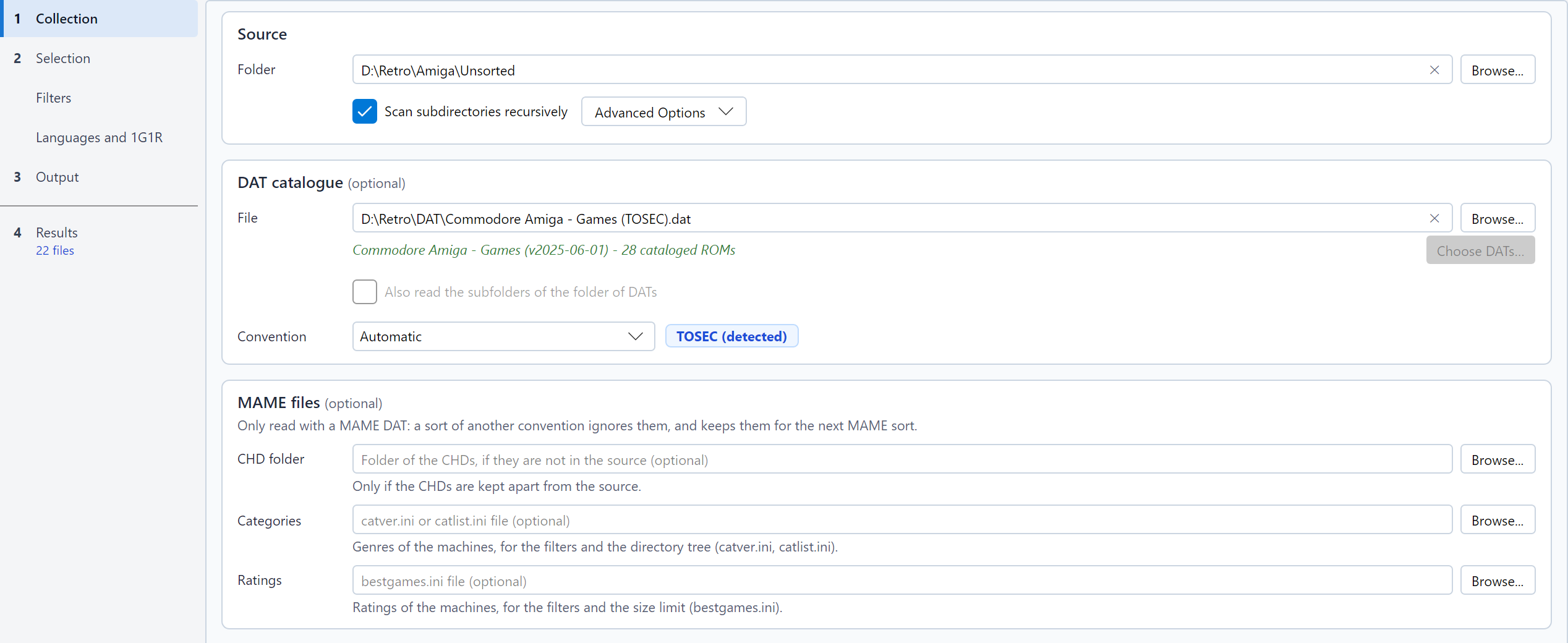
The source, the DAT file and the convention are set in the Collection step, in that order: the Source frame (the only required field), then the DAT catalogue frame (optional), which also holds the convention, and, with the MAME convention, the MAME files frame (optional). Without a DAT, a sentence under the field recalls that the games are then only recognised from the names of their files. A cross at the end of a file or folder field empties it: that is how you stop using a DAT, a CHD folder, or a category or rating file.
The Convention list, in the DAT catalogue frame, offers:
The effective convention also selects the filter settings shown in the Filters page (TOSEC, or No-Intro / Redump, also used for MAME and its software lists). With a lot of DATs, each DAT keeps its own convention; the effective convention is that of most of the DATs checked.
A TOSEC name holds its information in a fixed order:
Title v1.1 (demo) (1991)(Publisher)(System)(Video)(Country)(Language)(Copyright)(Status)(Media)[flags].extFor instance
Another World v1.1 (1991)(Delphine)(FR)(Disk 1 of 2)[cr Quartex].adf.
RomSieve reads the title, the version, the date, the publisher, the
system (A500, AGA, C64...), the video standard (PAL, NTSC), the
countries, the languages (en, fr-de,
M3 for "3 languages"), the media (Disk 1 of 2,
Side B, Tape 1) and the flags in brackets:
| Flag | Meaning |
|---|---|
[!] |
Verified dump |
[a], [a2] |
Alternate dump |
[b] |
Bad dump |
[o], [u] |
Overdump, underdump |
[v] |
Infected by a virus |
[cr], [t], [h],
[f], [m], [p] |
Crack, trainer, hack, fix, modification, pirate release |
[tr Fr] |
Translation |
A file whose name does not follow at least
Title (date)(publisher).ext is
non-conforming.
Title (Region) (Languages) (Rev 1) (Beta) (Disc 2).extFor instance Super Mario World (USA).sfc or
Final Fantasy VII (Europe) (Disc 1).cue. RomSieve reads the
regions, the languages, the revision, the development status (Beta,
Proto, Sample...), the unofficial releases (Unl, Pirate, Hack...), the
modern re-releases (Virtual Console, Switch Online, Classic Mini...) and
the disc number.
The No-Intro DATs of floppy disks (Acorn Archimedes...) number the
disks (Disk 1), (Disk 2)..., sometimes with a
label: (Disk 1, Game Disk),
(Disk 2 - Courses). RomSieve reads them as the disks of one
set, kept or left out together by 1G1R, even when the DAT describes each
disk as a game and makes the disks clones of one of them. Without a
total in the name, the set counts as many disks as the highest number
found.
A descriptor (.cue, .gdi,
.ccd) and its tracks (.bin, .img,
.sub...) form a set: they are analyzed,
renamed and transferred together, on disk as well as inside archives.
When a set has to be renamed to avoid a conflict, the descriptor is
rewritten to point to the renamed tracks.
A DAT file lists the ROMs of a collection with their name, size and
checksums (CRC32, often MD5 and SHA-1). RomSieve reads the
Logiqx XML (.dat, .xml) and
ClrMamePro (.dat) formats published by
TOSEC, No-Intro and Redump.
With a DAT:
_unmatched/, unless the filters exclude a tag of
its name (see Files
missing from the DAT): it is then excluded and stays in the
source;Some details:
The CRC32 is short: two different files may share it. With Verify SHA-1 checked (in the advanced options), RomSieve also computes the SHA-1 of each file identified by its CRC32 when the DAT provides one (Redump DATs do), and rejects the match if it differs. It is safer but slower, since each identified file is read again (a file inside a ZIP has to be decompressed).
A file in an archive (ZIP, 7z, RAR) is identified by the CRC32 the archive records for it, without being read, and a MAME set is copied as it is: a damaged archive whose header is right passes for complete. With Verify archive contents checked (in the advanced options), RomSieve decompresses every file of every archive and compares its content with that CRC32, as the full scan of a ROM manager does. A damaged file is non-conforming ("File damaged in its archive"), and a game with a damaged track is damaged as a whole; a damaged MAME set is non-conforming ("Damaged archive"), its ROMs counted as missing: repair it with a ROM manager. The first analysis is much slower, since every archive is decompressed; the result is then kept in the cache of the headers, and only a new or changed archive is read again. A file of a 7z or RAR archive that records no CRC32 cannot be verified.
CRC computation, in the preferences window, sets how many files are hashed at the same time: 1 file at a time suits a hard disk drive best; 2, 4, 8 or Automatic speed the analysis up on an SSD, an NVMe drive or a fast NAS. The result never depends on it. It is a sort option: it is saved in the profiles, and loading a profile can change it. The checksums are cached: a second analysis of unchanged files is much faster.
A MAME DAT (the output of mame -listxml, or a
non-merged or merged DAT made by SabreTools) makes the
MAME convention detected: the badge shows MAME
(detected). It can also be chosen in the list, but it requires a
MAME DAT.
With this convention, the unit is the set: an
archive (ZIP or 7z) bearing the short name of a machine
(sf2.zip).
{year}, {publisher}).area51/area51.chd) is identified by the SHA-1 of its
header and follows its set, into a folder of the same name. The disk of
a clone stored in the folder of its parent (merged CHDs) stays
there: MAME looks for it there too. When the CHDs are stored apart (a
CHD folder next to the ROMs, as in a full set),
enter that folder in the CHD folder field of the
MAME files frame of the Collection step (always shown,
in the colours of MAME with the MAME convention): its CHDs are read in
addition to the source, and its other files are ignored. The destination
must not overlap that folder, any more than the source. A sort of
another convention never reads it: the folder stays in the settings for
the next MAME sort, without a word in the log.neogeo.zip), as in merged and split
collections: the game is complete when that set is in the source, and
reported when it is missing. The same goes for the devices with
ROMs a game uses (qsound for the CPS2 games): unless its
set holds their ROMs (a fully non-merged set), the game needs
their sets, and is incomplete without them.cloneof relations
of the DAT; a SabreTools DAT has none, so its sets are grouped by
title). Two games with the same title but different parents stay apart,
and a BIOS or a device is a game of its own.RomSieve sorts the archives as they are: it never rebuilds, repairs nor converts a set.
| Romset | An archive holds | With RomSieve |
|---|---|---|
| non-merged | All the ROMs of its machine, BIOS included | Each parent and each clone is a set of its own: 1G1R and the filters choose between them. |
| merged | The parent and all its clones | Sorted as it is, with its clones: 1G1R and the filters choose the whole archive, not a clone. |
| split | Only the ROMs of its own machine | A parent is sorted normally. A clone does not run without the set of its parent: it is reported, and in 1G1R it always loses to its complete parent. |
In a merged or split collection, the games take from the BIOS sets the ROMs they share with their BIOS: put the BIOS and device sets in the source, and RomSieve sorts those the kept games need. To change the romset type, use a romset manager such as clrmamepro or RomVault.
Samples are not supported, and a file outside an archive (except a CHD) is not a MAME set.
The MAME DAT does not tell the genre of a machine. The community
publishes category files, which RomSieve reads when you enter one in the
Categories field of the Collection step
(--categories option on the command line):
catver.ini: a [Category] section of
machine=Genre / Subgenre lines;catlist.ini and genre.ini from
progettosnaps: one section per category, followed by its machines.
catlist.ini marks the arcade machines
(Arcade: Shooter / Flying Vertical): it allows excluding
the consoles, computers and other non-arcade machines of a full
set.A category followed by * Mature * marks a machine for
adults. A clone the file does not list takes the category of its parent.
The categories feed the filters,
the search of the table and the {genre} and
{category} variables of the folder pattern. A missing or
unreadable file is reported in the log, and the sort goes on without
categories.
progettosnaps also publishes bestgames.ini, which rates
a few thousand arcade games out of 100, by range of ten (from
0 to 10 (Worst) to 90 to 100 (Best Games)).
Enter it in the Ratings field of the
Collection step (--ratings option on the command
line): a clone takes the rating of its parent, and a machine the file
does not list is unrated. The ratings feed the rating filters and the size
limit; the detail panel of the table shows them.
Besides its arcade machines, MAME emulates consoles and computers,
whose cartridges, disks and tapes it describes in software
lists: one list per kind of media (megadriv for the
Mega Drive cartridges, a2600, cpc_flop...). A
Software List ROMs collection holds one folder per list, and
one archive per software in it (megadriv/sonic.zip).
RomSieve reads two kinds of DATs for a list:
megadriv.xml), whose header bears the name of the
list;hash folder (hash/megadriv.xml), which also
says the parent of each clone and how well MAME supports each
software;mame -getsoftlist megadriv > megadriv.xml. In
Windows PowerShell, a redirection rewrites the accented characters of
the descriptions: run the command in the command prompt
(cmd), or use the hash file.Each of these DATs makes the MAME software list convention detected (the badge shows MAME list (detected)), from the publisher its software name. The convention can also be chosen in the list, but it requires the DAT of the list.
To sort one list, choose its DAT and, as the source,
the folder of the list (Software List ROMs/megadriv).
To sort several lists at once, choose a
folder of DATs: Browse... next to the
DAT field, then Folder of DATs…, or
--dat <folder> on the command line. The folder holds
a DAT per list: the Software List ROMs folder of the
DatRoot of ROMVault, or the hash folder of
MAME. An output of MAME that holds several lists
(mame -getsoftlist, mame -listsoftware) works
the same way. The source is then the folder that holds a folder per list
(Software List ROMs), and Scan subdirectories
recursively must be checked.
Each archive belongs to the list of its folder
(megadriv/sonic.zip) and is only looked for in the DAT of
that list: sonic of megadriv and
sonic of another list are two software, two games, each
sorted into its folder. The source may also be the folder of a single
list.
A file outside the folder of a list (at the root of the source), or in a folder that no DAT names, is non-conforming; the log counts them and names a few.
The completion and the Miss List only count the lists present in
the source: a DAT of the folder whose list the source does not hold adds
nothing missing. The Miss List names each software with its list
(gamegear/shinobi).
The filtered DAT of the catalog, the DAT of your collection and
the fixdat are written as a DAT per list (as in the
DatRoot of ROMVault), at the root of the folder chosen:
megadriv.xml, gamegear.xml... Read from the
hash folder of MAME, they are written as MAME software
lists, which MAME reads (Exports).
A folder of software lists only holds lists: lists mixed with
DATs of another convention, or two DATs of the same list (the SabreTools
DAT and the hash file of megadriv, for instance), are
refused, and the field says why. A folder of No-Intro, Redump or TOSEC
DATs is a lot.
The first analysis of a whole collection is long on a network share (about 131,000 archives for MAME 0.289); the following ones read the headers of the unchanged archives from the cache.
As with the MAME sets, the unit is the archive of a software, identified by its short name or failing that by its ROMs, compared with the DAT (incomplete when it lacks a ROM), and transferred as it is, never re-zipped nor renamed.
The title, the regions, the languages, the revision, the date of
a prototype and the releases set apart (pirate, hack, crack, trainer,
translation, prototype, demo) come from the description
of the software, the year and the publisher from the DAT
({year}, {publisher}). The title is all the
text outside the parentheses and the brackets: Initiation au Langage
Basic (CEGOS) - Volume 3 has the title Initiation au Langage
Basic - Volume 3, so that each volume, level or part is a game of
its own.
A software goes into the folder of its list,
where MAME looks for it: megadriv/sonic.zip under the
destination. With All at the root, the destination is
the ROM folder of MAME; the folders of a pattern come above that of the
list, and the pattern preview recalls that MAME would not find the
software there.
For 1G1R, the software follow the order of the MAME lists. With a hash file, a clone joins its parent, even under another title (Castle of Illusion - Fushigi no Oshiro Daibouken and Castle of Illusion Starring Mickey Mouse), and 1G1R prefers the software MAME supports best. A SabreTools DAT has no parents: the software are grouped by title, so the versions of a game released under other titles stay apart.
The filters use the No-Intro / Redump settings. The dump quality has no effect (a ROM marked baddump is the best dump known), nor do the unlicensed releases and the modern re-releases, which the descriptions never mark; the MAME machines group only applies to the machines of a MAME DAT.
Some lists of computers describe a software disk by disk (Disk 1 of 2, Disk 2 of 2): each disk is then a game of its own, so that 1G1R keeps all of them, possibly from different releases.
Split sets. The Pleasuredome collections are
split: the archive of a clone only holds the ROMs it does not
share with its parent. With the hash file, RomSieve knows it: a kept
split clone takes its parent with it (the Required
badge), as MAME needs it. A SabreTools DAT lists only the own ROMs of a
clone and names no parent: the clone looks complete, and nothing tells
that it needs its parent. In MAME 0.289, this concerns 868 of the 41,505
clones of the lists, most of them in nes (416) and
msx2_flop (114); use the hash file for these lists.
A No-Intro, Redump or TOSEC pack holds hundreds, even thousands of
DATs, one per system. Rather than sorting the source once per DAT,
choose the folder that holds them:
Browse... next to the DAT field, then Folder of
DATs… (--dat <folder> on the command line).
This folder is a lot: the source is analysed once, each
file is sorted with the DAT that knows it, and each DAT keeps its
convention, its filters and its 1G1R.
The DAT may also be a ZIP, 7z or RAR archive, as it
was downloaded: choose it with Browse... (DAT
file…), or --dat pack.zip on the command line.
RomSieve reads it without extracting anything, and only takes its
.dat and .xml files.
hash/<list>.xml file) read from an archive is
exported as an XML DAT, not in MAME's format.Under the field, the information line sums the lot up: Lot of 3111 DATs (2900 TOSEC, 150 No-Intro, 61 Redump), 3111 checked. Only the headers of the DATs are read to show it, usually in a fraction of a second. While they are read, a progress bar counts the DATs read (1200 / 3111 DATs read), and Simulate (Dry-Run) and Start Sorting are greyed out: the sort waits until the DATs of the lot are known. The other settings can still be changed, and choosing another DAT or clearing the field drops the read. On its right, the Choose DATs… button (greyed out for a DAT file) opens the DATs of the lot window; it opens by itself when you choose a new folder with Browse..., once its DATs are read, and also at startup or when a profile is loaded if no DAT of the lot is checked. It always opens on every DAT. For a new folder, no DAT is checked: check those to sort with. Opened again with Choose DATs…, it keeps your boxes.
TOSEC/) when it is not at the
root of the folder chosen; the tooltip of a line names its file.C64 Games D64 shows the DATs that hold the three words,
-Demos leaves out those that hold Demos; the cross
at the end of the field clears the search.--dat-only <name> chooses the DATs to use.--dat-recursive). The box is greyed out for a DAT
file and for an archive, whose DATs are all read.A folder (or an archive) is refused, and the information line says why, when two of its DATs bear the same name (case ignored), when it holds a DAT of MAME machines (to choose alone), when it mixes MAME software lists with other DATs, or when all its DATs are unchecked.
Each DAT keeps the convention of its header: a lot may mix TOSEC, No-Intro and Redump DATs, each read with its names and filtered with its settings of the Filters page. The convention chosen in the Convention list only applies to the DATs no header tells; the log names the DATs whose detected convention wins over it. The badge and the Filters page follow the convention of most of the DATs checked; Settings for: shows the settings of the other family. The TOSEC variables of the pattern stay active as soon as a TOSEC DAT is checked.
Only the DATs that may know a file of the source are read whole, once the checksums are computed: sorting a small source with a whole TOSEC pack (3,000 DATs, more than a million ROMs) only keeps a few tens of MB in memory. A source that touches every DAT reads them all, twice (the lot, then each DAT): about 1.8 GB of memory for a whole pack.
With Inspect archives (ZIP, 7z, RAR) (advanced option, checked by default), RomSieve lists the files inside each archive and identifies them by the CRC32 recorded in the archive, without extracting anything. The kept files are extracted by the sort; the archive itself stays in place, even in Move mode.
.. is never written: see Safety, purge and undo.RomSieve reads the header of .chd files (versions 3 to
5) and their track list without decompressing them. An unreadable or
incomplete CHD is non-conforming.
.bin,
.cue), not the CHD that compresses them, so a CHD can never
match it by checksum. Identify CHDs by their name
(advanced option) links a CHD to the DAT game that has exactly its name.
The content is not verified: such files are shown as identified by
name, not verified and counted apart in the completion.